> ## Documentation Index
> Fetch the complete documentation index at: https://docs.gelato.cloud/llms.txt
> Use this file to discover all available pages before exploring further.
# Track & Debug Requests
We’ve introduced [UI Logs](https://app.gelato.cloud/logs) for Gelato Bundler endpoints!
* You can now track all your requests directly in the dashboard, and easily **debug failed requests** using built-in Tenderly simulations.
* Additionally, you can get info such as **response time, request body, response body**, and more.
## Debugging Failed Requests Using UI Logs
You can use the **UI logs** to debug failed requests directly from the Gelato app. These logs are available in the [Paymaster & Bundler](https://app.gelato.cloud/logs) section of the dashboard.
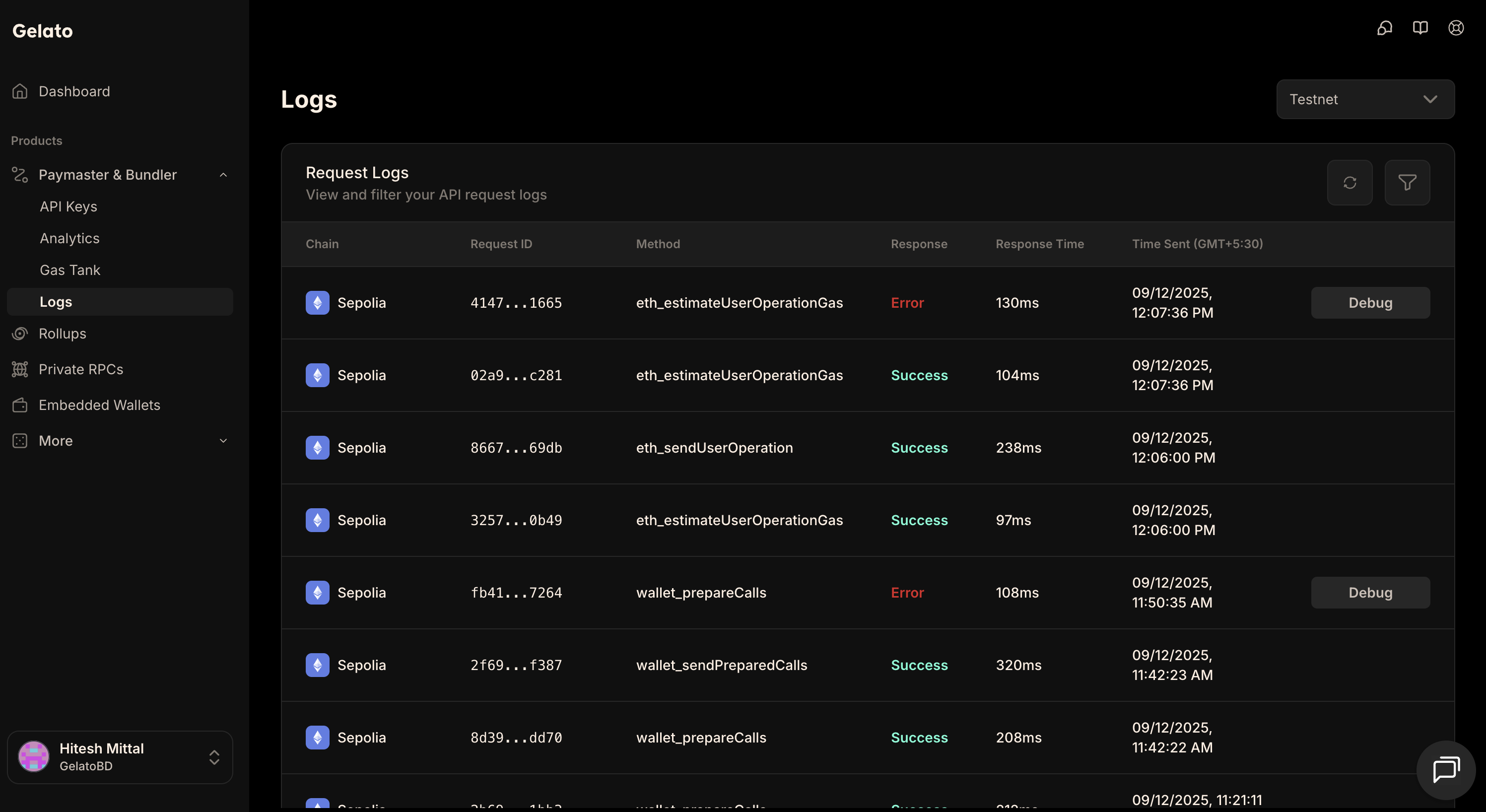 ### Steps to Debug
1. Go to the **logs** section and locate your failed bundler endpoints request.
2. On the right side of the log entry, click the **Debug** button.
3. A new option, **View Debug**, will appear. Click it.
4. This will open a **Tenderly simulation**, which you can use to analyze and debug the failed request.
## Using Status Endpoint
In any of the payment methods, when using `Gelato Bundler`, if you call the `eth_sendUserOperation` API endpoint, the returned `userOpHash` can also be used to track the status of the UserOperation through Gelato's infrastructure like this:
```bash theme={null}
curl --request POST \
--url https://api.gelato.cloud/rpc \
--header 'Content-Type: application/json' \
--header 'X-API-Key: YOUR_API_KEY' \
--data '{
"id": 1,
"jsonrpc": "2.0",
"method": "relayer_getStatus",
"params": {
"id": "0x0e670ec64341771606e55d6b4ca35a1a6b75ee3d5145a99d05921026d1527331",
"logs": false
}
}'
```
### Steps to Debug
1. Go to the **logs** section and locate your failed bundler endpoints request.
2. On the right side of the log entry, click the **Debug** button.
3. A new option, **View Debug**, will appear. Click it.
4. This will open a **Tenderly simulation**, which you can use to analyze and debug the failed request.
## Using Status Endpoint
In any of the payment methods, when using `Gelato Bundler`, if you call the `eth_sendUserOperation` API endpoint, the returned `userOpHash` can also be used to track the status of the UserOperation through Gelato's infrastructure like this:
```bash theme={null}
curl --request POST \
--url https://api.gelato.cloud/rpc \
--header 'Content-Type: application/json' \
--header 'X-API-Key: YOUR_API_KEY' \
--data '{
"id": 1,
"jsonrpc": "2.0",
"method": "relayer_getStatus",
"params": {
"id": "0x0e670ec64341771606e55d6b4ca35a1a6b75ee3d5145a99d05921026d1527331",
"logs": false
}
}'
```